 |  Login LoginProducts  SalesSupportDownloadsAbout SalesSupportDownloadsAbout |
| Home » Technical Support » ElevateDB Technical Support » Frequently Asked Questions |
 Frequently Asked Questions
When I try to migrate a database to ElevateDB using the ElevateDB Manager, the combo box does not contain any migrators. Why are there no migrators ?
1. ElevateDB includes the following migrator modules:
You can find these migrator modules as part of the ElevateDB Additional Software and Utilities (EDB-ADD) installation in the \libs subdirectory under the main installation directory. There are ANSI and Unicode versions of each of the migrators.
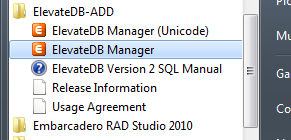
2. Start the appropriate version of the ElevateDB Manager (edbmgr.exe). If you wish to migrate to an ANSI ElevateDB database, then you should click on the link for the "ElevateDB Manager". If you wish to migrate to a Unicode ElevateDB database, then you should click on the link for the "ElevateDB Manager (Unicode)".
3. Make sure that the configuration file folder is set to the desired folder :
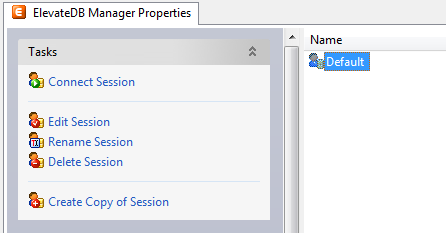
a. Select the Default session from the list of available sessions.
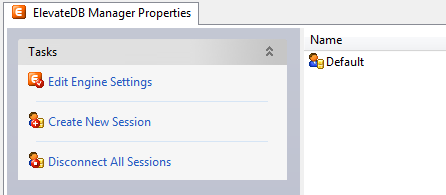
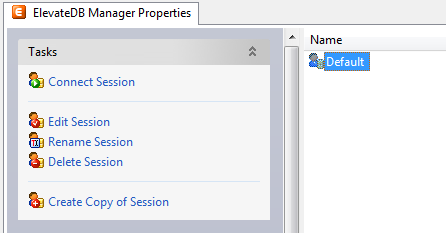
b. In the Tasks pane, click on the Edit Session link.
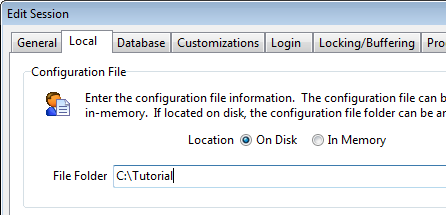
c. Make sure that the Configuration File - File Folder is set to the desired folder, which in this example is C:\Tutorial.
d. Click on the OK button.
3. Double-click on the Default session in the Properties window in order to connect the session.
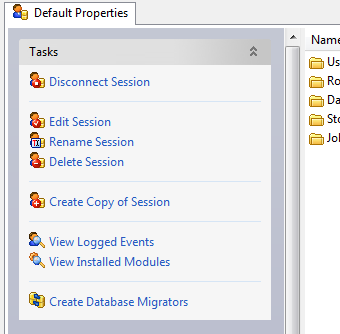
4. In the Tasks pane, click on the Create Database Migrators link. This will automatically create all of the database migrators that are shipped with the ElevateDB Manager.
| Module | Description |
| edbmigratedbisam1 | DBISAM Version 1.x migrator module |
| edbmigratedbisam2 | DBISAM Version 2.x migrator module |
| edbmigratedbisam3 | DBISAM Version 3.x migrator module |
| edbmigratedbisam4 | DBISAM Version 4.x migrator module |
| edbmigratebde | BDE (Borland Database Engine) migrator module |
| edbmigrateado | ADO (Microsoft ActiveX Data Objects) migrator module |
| edbmigratendb | NexusDB migrator module |
| edbmigrateadb | ADS (Advantage Database Server) migrator module |
You can find these migrator modules as part of the ElevateDB Additional Software and Utilities (EDB-ADD) installation in the \libs subdirectory under the main installation directory. There are ANSI and Unicode versions of each of the migrators.
2. Start the appropriate version of the ElevateDB Manager (edbmgr.exe). If you wish to migrate to an ANSI ElevateDB database, then you should click on the link for the "ElevateDB Manager". If you wish to migrate to a Unicode ElevateDB database, then you should click on the link for the "ElevateDB Manager (Unicode)".
3. Make sure that the configuration file folder is set to the desired folder :
a. Select the Default session from the list of available sessions.
b. In the Tasks pane, click on the Edit Session link.
c. Make sure that the Configuration File - File Folder is set to the desired folder, which in this example is C:\Tutorial.
d. Click on the OK button.
3. Double-click on the Default session in the Properties window in order to connect the session.
4. In the Tasks pane, click on the Create Database Migrators link. This will automatically create all of the database migrators that are shipped with the ElevateDB Manager.
 More Support Options
This web page was last updated on Wednesday, January 5, 2022 at 07:36 AM | Privacy PolicySite Map © 2026 Elevate Software, Inc. All Rights Reserved Questions or comments ?  E-mail us at info@elevatesoft.com E-mail us at info@elevatesoft.com |
