 |  Login LoginProducts  SalesSupportDownloadsAbout SalesSupportDownloadsAbout |
| Home » Technical Support » ElevateDB Technical Support » Technical Articles » Connections, Disconnections, and Reconnections |
 Connections, Disconnections, and Reconnections
Published on Wed, Aug 12 2009
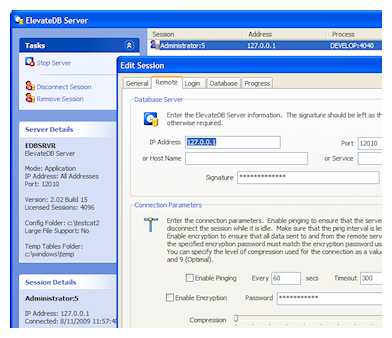 When using a remote session in a client application to connect to an ElevateDB Server, ElevateDB uses the operating system TCP/IP protocol support to perform all required communications to and from the ElevateDB Server. The TCP/IP protocol guarantees that any data stream sent either to or from an ElevateDB Server will arrive as a complete stream in the exact form that was sent. However, there is no way to guarantee that a given connection will be maintained indefinitely and not be interrupted by hardware or software issues that cause the connection to be lost. This article discusses how ElevateDB can handle such situations and how you can configure ElevateDB to optimally deal with them in the manner that you wish.
 It is important here to make a distinction between sessions and connections. Sessions are an ElevateDB construct only and sessions can exist on an ElevateDB Server without an active connnection, as well as use several different connections over their lifetime. Connections, on the other hand, are simply the communications mechanism that remote sessions use to send requests to, and receive responses from, an ElevateDB Server.
Configuring the ElevateDB Server
Before you can establish a remote session connection to an ElevateDB Server, you must first configure and start the ElevateDB Server. You will find out more general information on this in the Starting and Configuring the ElevateDB Server topic in the ElevateDB SQL Manual.
ElevateDB uses timeout settings with both remote sessions and the ElevateDB Server to control how long each end of a connection will sit idle waiting for a request or response from the other end of the connection. For the ElevateDB Server, this value can be configured via the configuration .ini file and the following configuration entry:
| Configuration Entry | Description |
| Server Session Timeout | Specifies how long the ElevateDB Server should wait for a request from a connected remote session before it disconnects the session. This is done to keep the number of concurrent connections at a minimum. Once a session has been disconnected by the ElevateDB Server, the session is then considered to be "dead" until either the remote session reconnects to the session in the server, or the server removes the session according to the parameters specified by the "Server Dead Session Interval", "Server Dead Session Expiration", and "Server Maximum Dead Sessions" configuration entries (below). A remote session may enable pinging in order to prevent the ElevateDB Server from disconnecting the remote session due to this configuration item. The default value is 180 seconds, or 3 minutes. |
Once a timeout is reached for a session on an ElevateDB Server, the session is disconnected and the dead session cleanup process begins for that session. There are three configuration entries on an ElevateDB Server that control how and when such sessions are removed automatically by the ElevateDB Server:
| Configuration Entry | Description |
| Server Dead Session Interval | Specifies how often the ElevateDB Server will poll the disconnected sessions to see if any need to be removed according to the "Server Dead Session Expiration" or "Server Maximum Dead Sessions" configuration entries (below). The default value is 30 seconds. |
| Server Dead Session Expiration | Specifies how long a session can exist in the ElevateDB Server in a disconnected, or "dead", state before the server removes the session. This is done to prevent a situation where "dead" sessions accumulate from client applications whose network connections were permanently interrupted. If all of the remote sessions accessing the ElevateDB Server are using pinging, then you should set this property to the minimum value of 10 seconds so that sessions are removed as soon as they stop pinging the server. The default value is 300 seconds, or 5 minutes. |
| Server Maximum Dead Sessions | Specifies how many "dead" sessions can accumulate in the ElevateDB Server before the server begins to remove them immediately, irrespective of the "Server Dead Session Expiration" configuration entry (above). If the "Server Maximum Dead Sessions" configuration entry is exceeded, then the server removes the "dead" sessions in oldest-to-youngest order until the number of "dead" sessions is at or under the setting for this configuration entry. The default value is 64. |
After all of these configuration entries are modified as desired, you can go ahead and start the ElevateDB Server so that you can proceed to test various configuration options for remote sessions in the client application.
Configuring Remote Sessions
For a remote session, the connection timeout value can be configured as follows:
| Type of Application | How to Configure |
| Delphi/C++Builder/Lazarus applications | The TEDBSession RemoteTimeout property |
| .NET applications | The TIMEOUT connection string attribute, or the EDBConnectionStringBuilder Class Timeout property. |
| ODBC applications | The TIMEOUT connection string attribute |
The default value is 180 seconds, or 3 minutes.
This timeout setting is important because it controls how long client applications wait for a response from an ElevateDB Server before an exception is raised. Once a timeout is reached for a remote session, the following occurs:
| Type of Application | What Happens |
| Delphi/C++Builder/Lazarus applications | If an event handler has been assigned to the TEDBSession OnRemoteTimeout event, then the event handler can decide whether or not to disconnect the remote session from the ElevateDB Server by assigning a value to the StayConnected parameter (default value is True). If no such event handler has been assigned, then the connection is closed for the remote session. In both cases an exception is raised with error code 1101 (EDB_ERROR_CLIENTLOST) to indicate that the remote session has been disconnected. |
| .NET applications | If an event handler has been assigned to the EDBConnection OnTimeout event, then the event handler can decide whether or not to disconnect the remote session from the ElevateDB Server by assigning a value to the StayConnected property of the EDBTimeoutEventArgs parameter (default value is True). If no such event handler has been assigned, then the connection is closed for the remote session. In both cases an exception is raised with error code 1101 (EDB_ERROR_CLIENTLOST) to indicate that the remote session has been disconnected. |
| ODBC applications | The connection is closed for the remote session, and an exception is raised with error code 1101 (EDB_ERROR_CLIENTLOST) to indicate that the remote session has been disconnected. |
To prevent a session from timing out on an ElevateDB Server, a remote session can be configured to ping the ElevateDB Server every x number of seconds. A ping is simply a request sent to an ElevateDB Server that resets the timeout period for the session, and prevents it from ever timing out. Pinging can be configured as follows:
| Type of Application | How to Configure |
| Delphi/C++Builder/Lazarus applications | The TEDBSession RemotePing and RemotePingInterval properties |
| .NET applications | The PING and PINGINTERVAL connection string attributes, or the EDBConnectionStringBuilder.Ping and PingInterval properties |
| ODBC applications | The PING and PINGINTERVAL connection string attributes |
The default value is True for enabling pinging, and 60 seconds, or 1 minute, for the ping interval.
It is important that you set the ping interval to a value that is less than the value configured for the session timeout on the ElevateDB Server. Failure to do so will result in the pinging having no effect at all, since the timeout will occur before the ping request has a chance to reach the ElevateDB Server.After you have configured a remote session and need to establish a remote session connection to an ElevateDB Server, the following information will help with that process:
| Type of Application | Information on How to Connect |
| Delphi/C++Builder/Lazarus applications | Connecting sessions |
| .NET applications | Use an EDBConnection Class object instance with connection strings or the EDBConnectionStringBuilder class. |
| ODBC applications | Connection strings |
Remote Session Reconnections
By default, ElevateDB will always try to reconnect a remote session if it detects that the session does not currently have an active connection to the ElevateDB Server, either due to a timeout (see above) or some other issue that has caused a disconnection. If a remote session is configured to use pinging, and the pinging is configured properly, then reconnections will not be necessary. However, if pinging is not being used, then a remote session can possibly exist on the ElevateDB Server in a disconnected state ("dead") for quite a while before it is removed. As long as the session has not been removed by the ElevateDB Server the remote session can reconnect to it. ElevateDB gives you an opportunity to control this process as follows:
| Type of Application | What Happens |
| Delphi/C++Builder/Lazarus applications | If an event handler has been assigned to the TEDBSession OnRemoteReconnect event, then the event handler can decide whether or not to reconnect the remote session to the session on the ElevateDB Server by assigning a value to the Continue and StopAsking parameters (default values are True and False, respectively). If no such event handler has been assigned, then the reconnection is automatically attempted once. If a reconnection fails, then an exception is raised with error code 1101 (EDB_ERROR_CLIENTLOST) to indicate the failure. |
| .NET applications | If an event handler has been assigned to the EDBConnection OnReconnect event, then the event handler can decide whether or not to reconnect the remote session to the session on the ElevateDB Server by assigning a value to the Continue and StopAsking properties of the EDBReconnectEventArgs parameter (default values is True and False, respectively). If no such event handler has been assigned, then the reconnection is automatically attempted once. If a reconnection fails, then an exception is raised with error code 1101 (EDB_ERROR_CLIENTLOST) to indicate the failure. |
| ODBC applications | The reconnection is automatically attempted once. If a reconnection fails, then an exception is raised with error code 1101 (EDB_ERROR_CLIENTLOST) to indicate the failure. |
Using a reconnection event handler can be useful for situations where you are shutting down a client application due a communication problem with the ElevateDB Server or some other issue and you don't really care if the remote session can no longer communication with the ElevateDB Server. In such a case, setting the Continue parameter/property to False and the StopAsking parameter/property to True will allow ElevateDB to shut down the remote session without triggering the reconnection event any further, regardless of whether the remote session has problems getting a response from the ElevateDB Server.
Summary
ElevateDB offers a fairly granular amount of control over how connections are handled for remote sessions. This will allow you to choose the connection model that fits your needs, while still retaining the option of switching to a different model in the future as your needs may change.
Hopefully we've been able to give you a little better understanding of how remote sessions and connections work in ElevateDB. As always, if you have any questions at all, please feel free to post them in the ElevateDB newsgroup here:
ElevateDB General Support Forum
This will allow everyone to share in any new ideas or comments that you may have regarding this article.
The next technical article will be entitled "Using Replication to Create an Incremental Backup of a Database", so look for it soon.
 More Support Options
This web page was last updated on Wednesday, January 13, 2021 at 12:15 AM | Privacy PolicySite Map © 2025 Elevate Software, Inc. All Rights Reserved Questions or comments ?  E-mail us at info@elevatesoft.com E-mail us at info@elevatesoft.com |
